How to Make a Tokyo Pop Art Dynamic Collage Video in 3 Clicks (1 Minute Total Workflow)
Turn any casual selfie into a scrolling, neon-tinged Tokyo retro pop art collage video in 3 clicks, no editing skills required, in under 60 seconds total.
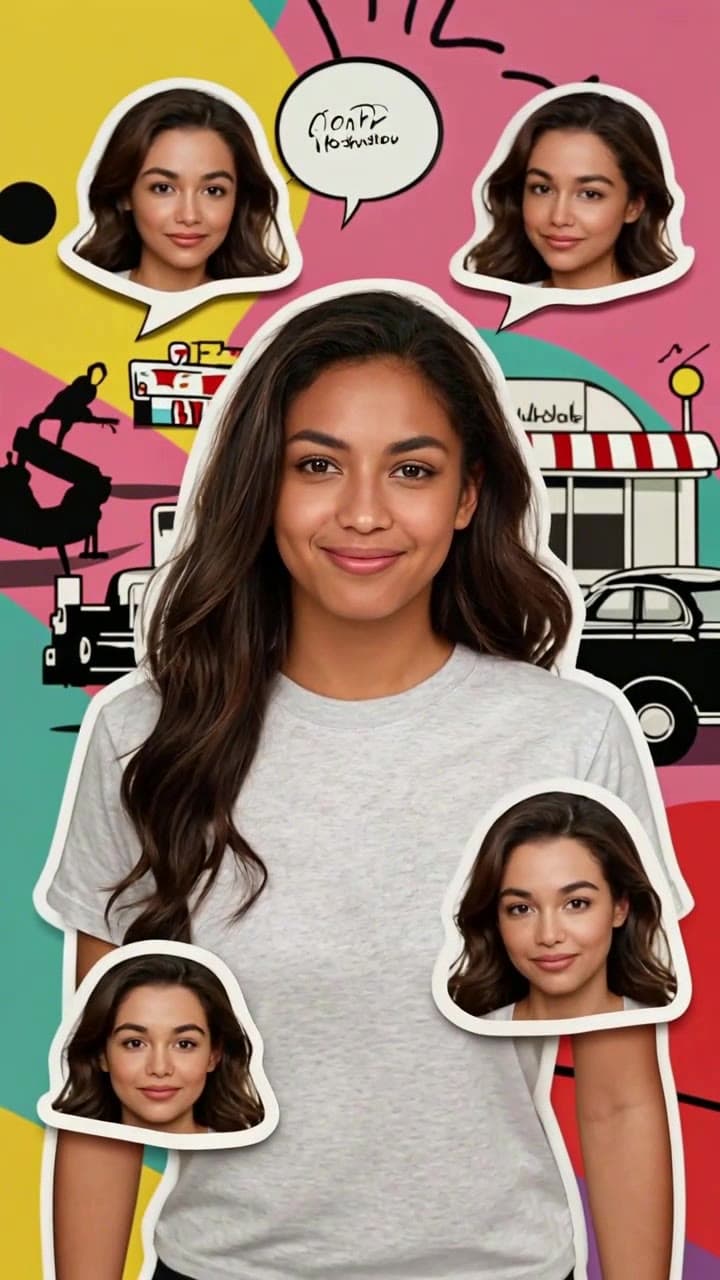
If you’ve ever scrolled TikTok and stopped dead for that hyper-saturated, halftone-dusted pop art reel that feels like it was pulled straight from a 1970s Tokyo shōjo manga ad, you know how eye-catching that vibe is. You don’t need 2 hours in After Effects or a custom commissioned illustration to make one for yourself — our pre-built AI template does all the heavy lifting, and the entire process takes less than a minute from start to finish.
Step 1: Pick the exact right selfie for zero AI glitches This is the only manual step that takes more than 2 seconds, and it’s the difference between a seamless, share-worthy clip and one with wonky facial cutouts. Stick to these simple rules for perfect results: - Use a well-lit front-facing selfie taken in natural indoor or outdoor light, no backlit shots that leave half your face in shadow - Make sure no hats, face masks, thick sunglasses, or overlaid TikTok filters cover your full face, and leave at least a half-inch of space above your forehead and below your jawline in the frame - Neutral, soft smiles work far better than over-the-top silly faces: the AI will generate tiny, playful micro-expression variations for the floating sticker cutouts around your main portrait, so a calm base keeps those variations looking natural, not uncanny - Skip group photos, blurry motion shots, or heavily cropped selfies that chop off your ears or jawline — those will break the template’s face-mapping tool and lead to misaligned sticker layers.
Step 2: Load the template and upload your photo Head straight to the [Tokyo Pop Art Dynamic Selfie Collage](/templates/tokyo-pop-art-dynamic-selfie-collage) template page, no account sign-up required to test a free generation. Once you drop your selected selfie into the upload box, the system will auto-populate all pre-set style parameters: it maps your facial features in 2 seconds, applies the signature 1960s Japanese retro pop art color grade, and layers in all the pre-vetted Tokyo-themed decorative assets — think vintage ramen diner neon signs, retro 90s Kei car silhouettes, cherry blossom halftone overlays, and tiny matcha latte sticker flourishes. The template is programmed to never add random, illegible AI-generated text, so you won’t end up with gibberish kanji cluttering your final clip.
If you want to tweak one small setting before generating, you can toggle the motion speed between “chill scroll” for a slow, vibe-focused Reel and “snappy bounce” for a high-energy TikTok clip — no other confusing sliders or editing menus to navigate.
Step 3: Generate, tweak if needed, and post in 10 seconds flat Hit the big pink generate button, and the system will render your full 5-second 9:16 vertical clip in roughly 10 seconds. A standard generation costs 1 free credit for new users, or 1 regular credit for returning users, no hidden fees for extra style layers. If you spot a tiny quirk like a slightly misaligned floating face sticker, you don’t have to re-do all your settings: just re-upload a selfie where your face is 10% more centered in the frame, and re-run the generation for a perfect result.
Once your clip is ready, you can download it straight to your camera roll, or pair it with trending lo-fi J-pop or city pop audio right in the ourpic.ai editor before posting. It’s perfect for everything from a fun birthday social media reveal to a creative profile banner for your Instagram art account, or even a playful clip to send to your group chat after a casual Tokyo trip. For more specific, actionable ways to use the template, check out our roundup of 7 fun use cases in 7 Tokyo Pop Art Dynamic Collage Video Ideas to spark your next post idea.


